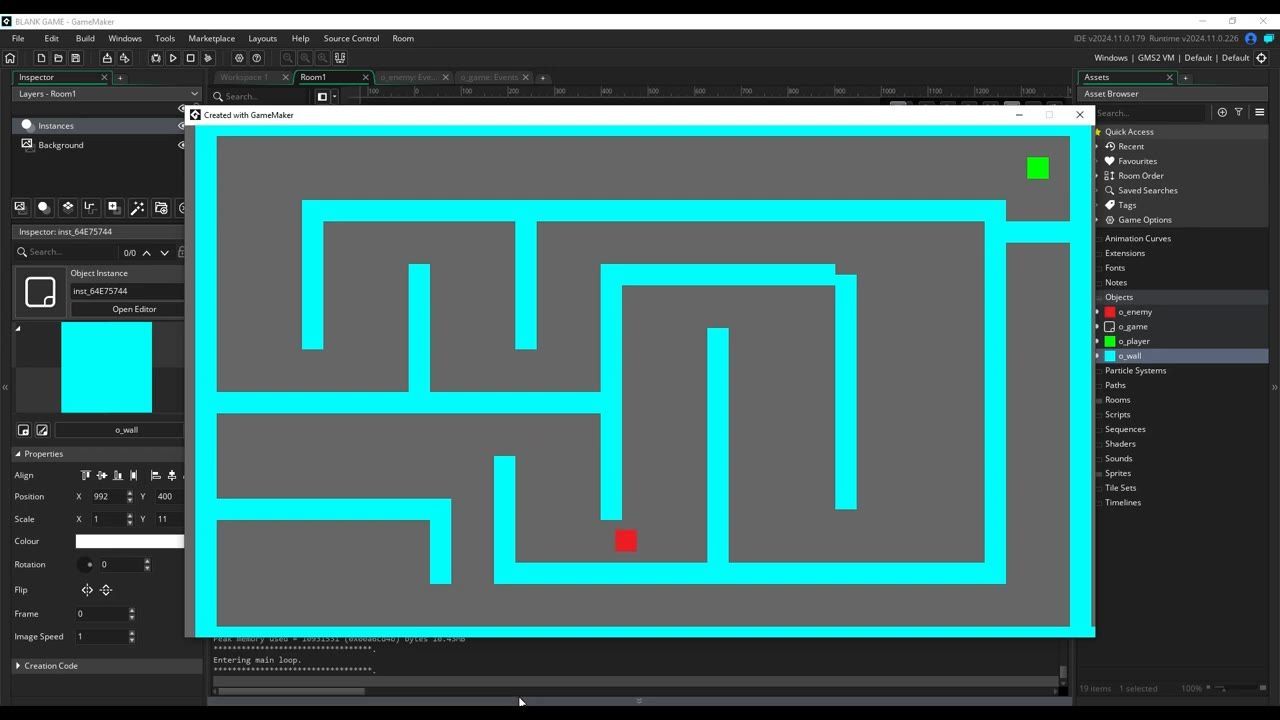
Use a basic pursuit function if you just want an enemy to chase the player in a straight line, but this will stop the enemy at walls. For smart pathfinding in a top-down GameMaker game, make a persistent object that builds a room grid and give the enemy a path that updates periodically to follow the player around obstacles, not through them.
What enemy pathfinding needs in GameMaker
prerequisites
- A room with wall objects, a player object, and an enemy object already placed.
- Enemy object is blank before adding code.
Start with direct AI movement toward the player
Start by giving the enemy simple chase behavior that moves directly toward the player and stops when blocked.

The o_enemy Step event is open while the code editor shows an autocomplete list for mp_linear_path. — Sane Game Studios
- The first two arguments are the player’s X and Y coordinates.
- The third is speed (enemy set slower than player).
- The last is the wall object to avoid.
This makes the enemy move straight for the player until a wall blocks the path. The enemy will halt if it collides with a wall.
Switch to path-based NPC navigation
For smarter chasing, switch to a path approach so the NPC can move around single obstacles.

The enemy object’s Create event is open in GameMaker Studio with path code being entered in the editor. — Sane Game Studios
In the enemy's Create event, declare a path variable:
path = undefined;mp_potential_path_objecttries to find a route from the enemy to the player, avoiding walls.- The factor value (
2) prevents infinite loops and should be above 1. - The path is started using
path_start, with speed set to 3, stopping at the path's end, and not using the path editor (absolute set to false).
This approach lets the enemy route around basic obstacles but can still fail with more complex blockades, getting stuck if the direct path is impossible.
Build a room grid for grid pathfinding
For more robust pathfinding that can handle complex arrangements of walls, define a grid that models the room's walkable and blocked areas.

GameMaker shows an object event code window with grid creation code in the Step event. — Sane Game Studios
In its Create event:
grid = undefined;In the Step event, add code to create the grid once:
if (grid == undefined) { grid = mp_grid_create(0, 0, room_width / 32, room_height / 32, 32, 32); mp_grid_add_instances(grid, o_wall, false); }- The grid covers the room in 32x32 tiles.
- All instances of the wall object are marked as blocked.
To verify the grid, add temporary drawing code in the Draw event:
if (grid != undefined) {
    mp_grid_draw(grid);
}
This visualization helps ensure walls and open spaces are represented properly.
Place an instance of the grid management object anywhere in your room before testing.
Use grid pathfinding for top-down game obstacles
Move enemy pathfinding to use your grid for correct navigation around multiple obstacles.

GameMaker shows an enemy Step event with an mp_grid_path() call in the code editor and the object list on the right. — Sane Game Studios
- This line requests a new path from the enemy’s current position to the player’s, allowing diagonal movement.
- The enemy moves much more intelligently, navigating between walls and around complex obstacles.
Test this by arranging walls in the room to form an obstacle course. The enemy should actively follow the player wherever they move.
Clean up movement logic so it stays fast
 GameMaker Studio shows the o_enemy object event menu open on Alarm and the delayed path refresh code in the editor.
FAQ
GameMaker enemy pathfinding tutorial
This guide demonstrates step-by-step approaches to get enemies to follow the player with direct movement, path-based avoidance, and full grid pathfinding for top-down games.
how to make enemies follow the player in GameMaker
Give the enemy object code to move toward the player's coordinates, first by direct step, then using pathfinding functions to avoid walls and follow the player around obstacles.
pathfinding for top-down GameMaker games
Use a grid system based on room dimensions and wall locations, then call the grid pathfinding function to update enemy paths as the player moves. Trigger path updates intermittently for efficiency.
GameMaker AI navigation tutorial
Set up a central persistent object to create and manage the room grid, marking walls as blocked. Have enemies check this object for the grid before building a path to the player, enabling smarter movement patterns.
GameMaker Studio 2 pathfinding basics
Start with direct linear pursuit, advance to simple path variables, and upgrade to grid-based pathfinding using built-in grid and path functions to allow dynamic navigation and real gameplay challenges.
Official reference: GameMaker manual.
Sources
Screenshots on this page are frames from the videos below, used to illustrate the steps they describe. All rights remain with their creators.
- Gamemaker Enemy Pathfinding Tutorial — Sane Game Studios, February 20, 2025
Checked against:
- Read The Latest News & Interviews | GameMaker Blog — gamemaker.io